Configuration · fixed fee
Get the data right
Every report, alert and AI answer you get from MyGeotab depends on how it was set up. We set it up properly, or we find what's wrong with your existing set-up and fix it.

Example built on Geotab demonstration data. No client data is shown. The “before” view was set up badly on purpose to show common faults.
Signs
How to tell your set-up needs work
Reports that don't add up. Totals change depending on who runs the report, or don't match what you know happened.
Alerts nobody believes. Speeding and idling exceptions arrive by the hundred, so they get ignored.
Vehicles in the wrong groups. Or in no group at all, so depot and team reports leave them out.
Trips with no driver. You can see where a vehicle went but not who was driving it.
Stops marked as unknown. Your own depots and regular sites aren't set up as zones.
What's included
What we set up and fix
Four building blocks of a MyGeotab set-up: rules, zones, groups and driver identification.
Rules
Exception rules for speeding, idling, harsh driving and after-hours use, with thresholds that suit your vehicles and your work. The alerts that come through should be worth reading.
Zones
Depots, yards, job sites and other places you visit often, drawn as zones so stops have names. Time on site and travel between sites become clear.
Groups
Vehicles and users grouped the way you actually run the fleet, by depot, team, region or cost centre. Reports then line up with how the business is organised.
Driver identification
Every trip linked to a driver, using a method that suits your fleet and the way your drivers work.
Audit and clean-up of an existing database
If you already run MyGeotab, we go through it from top to bottom: groups, rules, zones, users, vehicle names and driver identification. We list what's wrong, agree the fixes with you, and make them.
An example
Same fleet. Different answers.
This demonstration runs the same idling report twice on the same fleet. First on a set-up with common faults, then after a clean-up. Nothing about the vehicles or devices changes. The answers do.
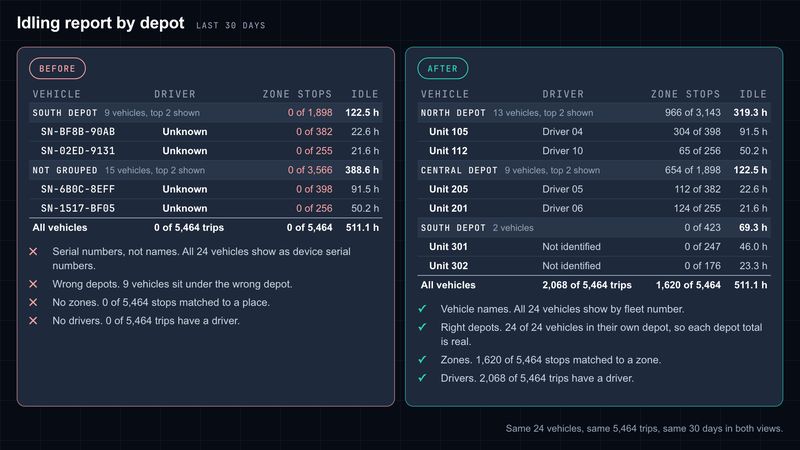


Same fleet, set up badly and then set up properly
Same fleet. Same devices. Different answers.
What happens in the recording: An idling report by depot is run on a badly configured set-up. Vehicles show as serial numbers, no stop is matched to a zone, no trip has a driver and the depot totals are in the wrong place. The faults are then fixed: groups, vehicle names, zones and driver identification. The same report is run again on the same data and shows named vehicles in the right depots, with drivers and zone stops.
Example built on Geotab demonstration data. No client data is shown. The “before” view was set up badly on purpose to show common faults.
How it's charged
One fixed fee, agreed up front
Configuration is charged as a fixed fee. We agree the scope with you before any work starts, usually based on what the health check found, so you know what you're paying for and what you'll get.
What comes next
Keeping it right after we've fixed it
A clean set-up drifts. New vehicles arrive, staff change, and groups and rules slowly fall out of step with the business. Our monthly service keeps it in order.
MyGeotab as a serviceFree data health check
Start with a free health check
The health check shows what needs fixing before anything is quoted. You get a two to three page written report on your top five problems and how to fix them, then a 30-minute call. It's free, and it's not a sales pitch.